Android Interview Questions and Answers – A Quick Guide for Developers
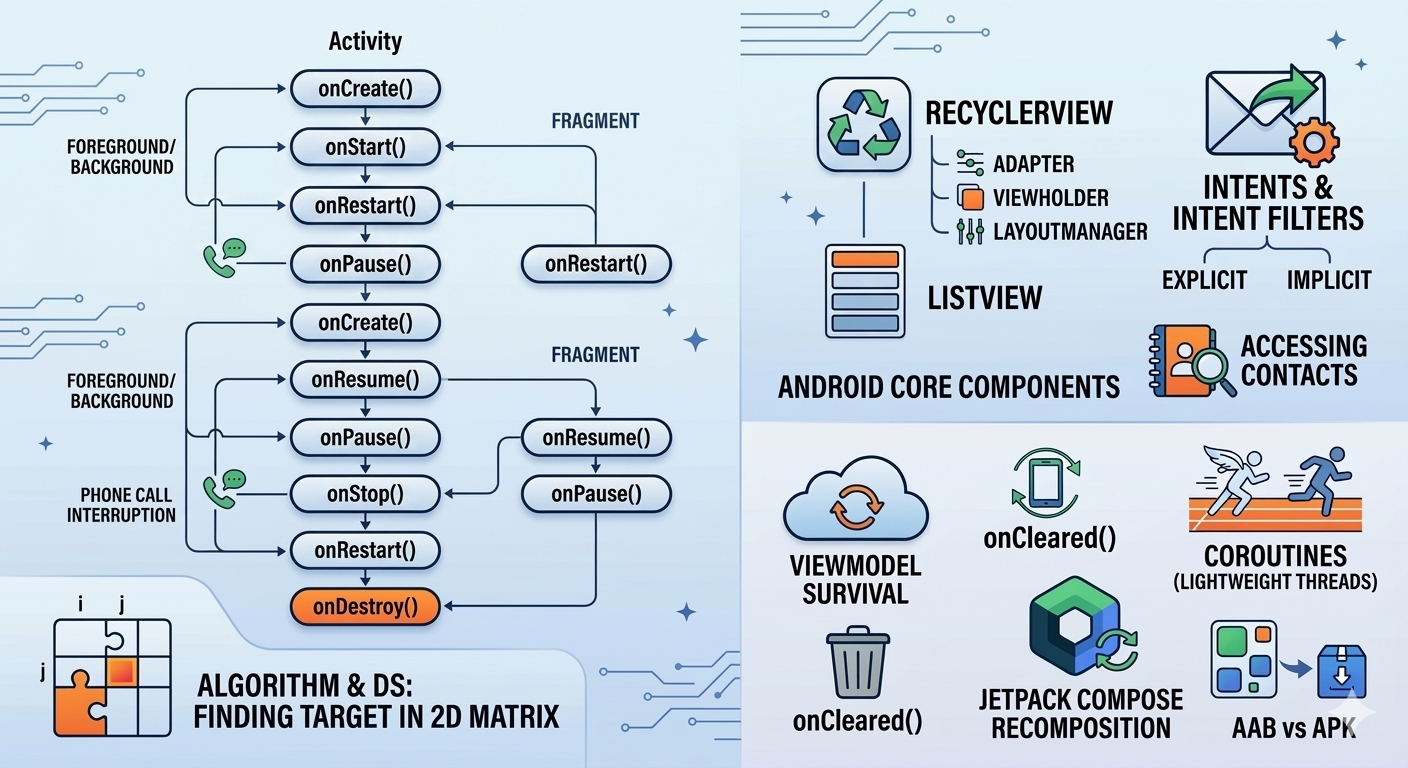
Android interviews often test more than syntax. Interviewers want to know whether you understand component lifecycles, UI rendering, data access, concurrency, performance, and the reasoning behind Android’s architecture.
This guide explains 16 commonly asked Android interview questions with practical answers and Kotlin examples.
1. Explain the Activity Lifecycle
An Activity moves through several lifecycle states as it is created, displayed, paused, stopped, restarted, and destroyed. Android provides six primary lifecycle callbacks: onCreate(), onStart(), onResume(), onPause(), onStop(), and onDestroy(). citeturn0search10
The usual launch sequence is:
onCreate()
↓
onStart()
↓
onResume()The Activity is now visible and ready for user interaction.
onCreate()
Called when the Activity is created.
Typical responsibilities include:
Initializing variables.
Calling
setContentView().Setting up View Binding or Compose.
Configuring ViewModels.
Restoring saved state.
Setting click listeners.
override fun onCreate(savedInstanceState: Bundle?) {
super.onCreate(savedInstanceState)
setContentView(R.layout.activity_main)
}onStart()
Called when the Activity becomes visible to the user.
onResume()
Called when the Activity enters the foreground and the user can interact with it.
onPause()
Called when the Activity is losing focus but may still be partially visible.
Examples include:
A dialog appearing.
Another Activity coming in front.
The user opening a system overlay.
Keep onPause() lightweight because the next component may not start until it completes.
onStop()
Called when the Activity is no longer visible.
This is a suitable place to pause expensive work that does not need to continue while the screen is hidden.
onRestart()
Called when a stopped Activity is about to start again.
The usual sequence when returning from the stopped state is:
onRestart()
↓
onStart()
↓
onResume()onDestroy()
Called before the Activity is destroyed.
This can happen because:
The user finishes the Activity.
The system destroys it.
A configuration change occurs, such as screen rotation.
Do not rely on onDestroy() for critical data persistence because the process may be killed without giving the Activity a chance to run this callback.
2. Activity Lifecycle Sequence
The most common sequences are:
First Launch
onCreate()
onStart()
onResume()Another Activity Covers It
onPause()
onStop()Returning to the Activity
onRestart()
onStart()
onResume()Finishing the Activity
onPause()
onStop()
onDestroy()The exact callback sequence can vary depending on the type of window, navigation operation, system state, and whether the Activity is being recreated.
3. What Happens to a Fragment When Its Activity Is Paused or Resumed?
A Fragment has its own lifecycle, but it is hosted by an Activity or another Fragment. Its lifecycle cannot move beyond the lifecycle state of its host. citeturn0search0turn0search11
When the hosting Activity is paused:
Fragment.onPause()When the hosting Activity is stopped, the Fragment generally receives:
Fragment.onStop()When the Activity resumes, the Fragment usually moves through:
Fragment.onStart()
Fragment.onResume()The correct method name is onResume(), not onResumed().
A typical Fragment lifecycle is:
onAttach()
onCreate()
onCreateView()
onViewCreated()
onStart()
onResume()When it is removed or stopped, the callbacks move in the reverse direction:
onPause()
onStop()
onDestroyView()
onDestroy()
onDetach()onDestroyView() is particularly important because a Fragment can remain in memory while its View hierarchy is destroyed. View Binding references should normally be cleared there.
4. What Happens When a Phone Call Comes In?
The exact callbacks depend on how much of the app is covered by the call UI and whether Android stops the Activity.
In a common scenario:
Activity:
onPause()
onStop()A Fragment hosted by that Activity may also receive:
onPause()
onStop()When the user returns to the app, the Activity generally receives:
onRestart()
onStart()
onResume()The Fragment then moves back through its active states as controlled by the FragmentManager.
However, a phone call does not guarantee one exact sequence in every Android version or device configuration. If the call appears as a small overlay, the Activity may only be paused and may not receive onStop().
The important rule is to use lifecycle callbacks based on state rather than assuming a particular interruption always produces the same sequence.
5. How Does RecyclerView Work?
RecyclerView displays collections of data efficiently by reusing item views instead of creating a new view for every item.
It uses three primary components:
Adapter
The Adapter connects the data source to the RecyclerView.
It creates ViewHolders and binds data to them.
ViewHolder
The ViewHolder stores references to the views used by an item.
class UserViewHolder(
private val binding: ItemUserBinding
) : RecyclerView.ViewHolder(binding.root)LayoutManager
The LayoutManager controls how items are positioned.
Common options include:
LinearLayoutManager.GridLayoutManager.StaggeredGridLayoutManager.
A simplified Adapter looks like this:
class UserAdapter(
private val users: List<User>
) : RecyclerView.Adapter<UserViewHolder>() {
override fun onCreateViewHolder(
parent: ViewGroup,
viewType: Int
): UserViewHolder {
val inflater = LayoutInflater.from(parent.context)
val binding = ItemUserBinding.inflate(inflater, parent, false)
return UserViewHolder(binding)
}
override fun onBindViewHolder(
holder: UserViewHolder,
position: Int
) {
holder.bind(users[position])
}
override fun getItemCount(): Int = users.size
}When the user scrolls, off-screen ViewHolders are reused for newly visible items.
6. ListView vs RecyclerView
Feature | ListView | RecyclerView |
|---|---|---|
ViewHolder pattern | Optional and manually implemented | Built into the design |
Layout support | Mainly vertical lists | Linear, grid, staggered, and custom layouts |
Animations | Limited | Built-in and customizable |
Multiple view types | More cumbersome | Better supported |
Item decoration | Limited | Supported through |
Performance | Suitable for simple lists | Better for complex and large lists |
Pagination support | Mostly manual | Works well with Paging 3 |
Modern Android usage | Mostly legacy code | Common in existing View-based apps |
RecyclerView is more flexible and scalable, although Jetpack Compose applications commonly use lazy layouts such as LazyColumn and LazyRow for new UI. Android also provides migration guidance from RecyclerView to Compose lazy lists. citeturn0search8
7. How Does onBindViewHolder() Work?
onBindViewHolder() binds data to a ViewHolder at a specific adapter position.
override fun onBindViewHolder(
holder: UserViewHolder,
position: Int
) {
holder.bind(users[position])
}It may be called when:
A ViewHolder becomes visible.
A new ViewHolder is created.
An existing ViewHolder is reused during scrolling.
The adapter reports that an item changed.
The list is refreshed.
A partial update is requested.
There is no fixed number of calls.
Initially, it is usually called for the visible items plus a small prefetch area. During scrolling or data updates, it may be called many more times.
This is why onBindViewHolder() should remain efficient:
Avoid expensive database queries.
Avoid creating unnecessary objects.
Avoid starting uncontrolled network calls.
Keep image loading properly managed.
Use
ListAdapterandDiffUtilfor efficient updates.
8. What Is an Intent?
An Intent is a messaging object used to request an action from another Android component.
It can be used to:
Start an Activity.
Start a Service.
Send a Broadcast.
Open another application.
Pass data between components.
Explicit Intent
An explicit Intent names the exact component to start.
val intent = Intent(this, SecondActivity::class.java)
intent.putExtra("user_id", "123")
startActivity(intent)Use explicit Intents when navigating within your own application.
Implicit Intent
An implicit Intent describes an action without naming a specific component.
val intent = Intent(
Intent.ACTION_VIEW,
Uri.parse("https://www.google.com")
)
startActivity(intent)Android searches for an application that can handle the requested action.
Always consider that no suitable app may exist:
if (intent.resolveActivity(packageManager) != null) {
startActivity(intent)
}9. What Is an Intent Filter?
An Intent Filter declares the types of implicit Intents that a component can handle.
It is generally defined in AndroidManifest.xml and can specify:
An action.
A category.
Data such as a URI or MIME type.
Example:
<activity
android:name=".DeepLinkActivity"
android:exported="true">
<intent-filter>
<action android:name="android.intent.action.VIEW" />
<category android:name="android.intent.category.DEFAULT" />
<category android:name="android.intent.category.BROWSABLE" />
<data
android:scheme="https"
android:host="example.com" />
</intent-filter>
</activity>This tells Android that the Activity can handle matching web links.
An Intent Filter is not a permission mechanism. It declares capability and routing behavior. You must still protect exported components and validate incoming data.
10. How Can You Access Contacts?
Contacts are exposed through the Contacts Provider, which is accessed through ContactsContract and ContentResolver.
First, add the permission:
<uses-permission android:name="android.permission.READ_CONTACTS" />Then request it at runtime:
if (
ContextCompat.checkSelfPermission(
this,
Manifest.permission.READ_CONTACTS
) != PackageManager.PERMISSION_GRANTED
) {
ActivityCompat.requestPermissions(
this,
arrayOf(Manifest.permission.READ_CONTACTS),
READ_CONTACTS_REQUEST
)
}After permission is granted, query the provider:
val projection = arrayOf(
ContactsContract.CommonDataKinds.Phone.DISPLAY_NAME,
ContactsContract.CommonDataKinds.Phone.NUMBER
)
contentResolver.query(
ContactsContract.CommonDataKinds.Phone.CONTENT_URI,
projection,
null,
null,
ContactsContract.CommonDataKinds.Phone.DISPLAY_NAME + " ASC"
)?.use { cursor ->
val nameIndex = cursor.getColumnIndex(
ContactsContract.CommonDataKinds.Phone.DISPLAY_NAME
)
val numberIndex = cursor.getColumnIndex(
ContactsContract.CommonDataKinds.Phone.NUMBER
)
while (cursor.moveToNext()) {
val name = cursor.getString(nameIndex)
val number = cursor.getString(numberIndex)
}
}Important practices include:
Request only the permission you need.
Explain why the permission is required.
Handle denial gracefully.
Close the Cursor using
use.Avoid collecting more contact data than necessary.
Consider Android and Google Play privacy requirements.
11. Can an App Access Data from Other Apps?
Android isolates applications using an application sandbox. An app generally cannot directly access another app’s private files, databases, or internal storage.
Approved communication mechanisms include:
Content Providers.
Intents.
Document picker APIs.
System APIs.
User-selected files.
Share sheets.
Explicit runtime permissions where applicable.
For example, an app may allow the user to choose a document using the Storage Access Framework instead of trying to read another app’s private storage.
Access to sensitive data, such as contacts, location, SMS, call logs, or media, requires both:
The appropriate Android permission.
A legitimate and clearly explained use case.
Google Play also applies policy requirements to sensitive permissions and user data. Your app should request data only when it is necessary for a user-facing feature, disclose its use clearly, and avoid accessing data unrelated to the core functionality.
Android sandboxing and platform APIs should be treated as the normal design boundary, not as obstacles to bypass.
12. How Does ViewModel Survive Configuration Changes?
A ViewModel survives configuration changes because it is stored in a ViewModelStore associated with the Activity or Fragment rather than being stored directly inside the UI object.
When a configuration change occurs:
The current Activity is destroyed.
Android creates a new Activity instance.
The existing
ViewModelStoreis retained by the framework.The new Activity retrieves the existing ViewModel instance.
This prevents the ViewModel from being recreated during events such as:
Screen rotation.
Language changes.
Theme changes.
Some multi-window changes.
A ViewModel should store screen-related UI state, but it should not be treated as permanent storage. If the process is killed, the ViewModel is also lost.
For process-death recovery, use mechanisms such as:
SavedStateHandle.Room.
DataStore.
A backend source of truth.
Also note that a ViewModel is scoped to its owner:
private val viewModel: UserViewModel by viewModels()This creates an Activity- or Fragment-scoped ViewModel depending on where it is declared.
13. Which ViewModel Method Is Called Before Destruction?
onCleared() is called when the ViewModel is permanently removed from its ViewModelStore.
class UserViewModel : ViewModel() {
override fun onCleared() {
super.onCleared()
// Release ViewModel-owned resources
}
}It can be used to:
Cancel custom resources.
Close a manually managed connection.
Remove non-lifecycle-aware observers.
Release custom callbacks.
Clean up external resources owned by the ViewModel.
However, coroutines launched in viewModelScope are automatically cancelled when the ViewModel is cleared. You usually do not need to cancel them manually.
Do not use onCleared() as a replacement for lifecycle-aware resource management. For example, a camera preview or location listener tied to a screen may need to stop when the UI is stopped rather than only when the ViewModel is destroyed.
14. What Happens When Multiple RecyclerViews Are Inside a NestedScrollView?
Placing multiple vertically scrolling RecyclerViews inside a NestedScrollView is usually discouraged.
Potential problems include:
Conflicting scroll handling.
Expensive measurement.
RecyclerViews expanding to show many or all items.
Reduced view recycling.
High memory usage.
Slow initial layout.
Poor nested scrolling performance.
It can sometimes be made to work with careful configuration, but it is not usually the best architecture for large or dynamic lists.
Better alternatives include:
A single RecyclerView with multiple view types.
ConcatAdapter.Paging 3.
A single Compose
LazyColumn.A custom screen model representing headers, sections, and content.
ConcatAdapter
ConcatAdapter combines multiple adapters into one RecyclerView:
val concatAdapter = ConcatAdapter(
headerAdapter,
listAdapter,
footerAdapter
)
recyclerView.adapter = concatAdapterThis is useful for screens containing:
A header.
A featured section.
A list.
A loading section.
A footer.
It improves modularity without requiring one extremely large adapter.
15. How Are Coroutines Lightweight?
A coroutine is not an operating-system thread.
A thread is a relatively expensive system resource with its own memory and scheduling overhead. A coroutine is a lightweight unit of work managed by Kotlin and executed on threads provided by a dispatcher.
For example:
viewModelScope.launch {
val result = repository.loadData()
}When the coroutine reaches a suspension point, such as a network call or delay():
The coroutine suspends.
The underlying thread is released.
Another coroutine can use that thread.
The coroutine resumes later, possibly on another thread.
This allows many coroutines to share a relatively small thread pool.
However, a coroutine does not automatically make blocking code efficient:
viewModelScope.launch {
Thread.sleep(5000)
}The above still blocks the thread.
Use appropriate dispatchers:
withContext(Dispatchers.IO) {
blockingOperation()
}Also remember:
Dispatchers.Mainis for UI work.Dispatchers.IOis for blocking I/O.Dispatchers.Defaultis for CPU-intensive work.
A well-designed suspend function should avoid blocking the thread unnecessarily.
16. How Does Jetpack Compose Know When to Recompose?
Jetpack Compose uses state observation and a composition system.
When a composable reads a state value, Compose tracks that dependency. If the value changes, Compose schedules recomposition for the affected scope. It does not blindly execute every line of every composable on every state change.
@Composable
fun Counter() {
var count by remember { mutableStateOf(0) }
Column {
Text(text = "Count: $count")
Button(onClick = { count++ }) {
Text("Increment")
}
}
}When count changes, Compose knows that the parts reading count may need to be recomposed.
Compose also skips composables and lambdas when their inputs have not changed. The official Compose mental model describes recomposition as calling composable functions again when inputs change while skipping unchanged work where possible. citeturn0search9
Does Compose Recompose on Every Word?
It depends on how state is updated.
If text is stored in Compose state and updated for every keystroke:
var text by remember { mutableStateOf("") }then the composables that read text may recompose on each change.
That is expected and usually efficient for normal input fields.
Compose does not recompose every line in the entire application. It tracks state reads and limits work to affected parts of the composition.
To improve performance:
Keep state as close as possible to where it is used.
Avoid unnecessary state reads high in the UI tree.
Use stable data models.
Use keys in lazy lists.
Avoid expensive work inside composables.
Move business logic to ViewModels or other layers.
Use derived state when appropriate.
Recomposition is not the same as rebuilding the entire Android view hierarchy. It is a targeted process that updates the UI based on changed inputs.
17. Why Use AAB When APK Already Exists?
An APK is the installable package delivered to an Android device.
An Android App Bundle, or AAB, is a publishing format containing your app’s compiled code and resources. Google Play uses the bundle to generate optimized APKs for individual device configurations. citeturn0search1
A universal APK may contain resources for:
Multiple CPU architectures.
Multiple screen densities.
Multiple languages.
Different device configurations.
That can increase download size.
With an AAB:
The developer uploads one bundle to Google Play.
Google Play analyzes the bundle.
Google Play generates optimized APKs.
Each user receives the parts required by their device.
This can reduce download size and improve delivery efficiency.
AAB is a publishing format, not a replacement for APK in every scenario. APK files are still useful for:
Local installation.
Direct testing.
Some enterprise distribution cases.
Internal sharing.
Emulator testing.
For Google Play publishing, new apps have generally been required to use Android App Bundles since August 2021. citeturn0search13
18. Finding a Target in a 2D Matrix
The simplest solution is to traverse every row and column and compare each value with the target.
fun findTarget(
matrix: Array<IntArray>,
target: Int
): Pair<Int, Int>? {
for (row in matrix.indices) {
for (column in matrix[row].indices) {
if (matrix[row][column] == target) {
return row to column
}
}
}
return null
}Example:
val matrix = arrayOf(
intArrayOf(10, 20, 30),
intArrayOf(40, 50, 60),
intArrayOf(70, 80, 90)
)
val result = findTarget(matrix, 50)
// result = Pair(1, 1)The returned value represents:
row index = 1
column index = 1Complexity
If the matrix contains m rows and n columns:
Time complexity:
O(m \times n)Space complexity:
O(1)
This brute-force solution works for any matrix.
If the matrix has additional ordering properties, you may be able to improve the solution. For example, if every row and column is sorted, a top-right traversal can find the target in O(m+n) time.
Comments (0)
No comments yet. Be the first to share your thoughts!
Leave a Comment
Get the latest updates
Join our newsletter and never miss an article.